
ProductBackground workflow guide
What Is Your Product Standing For?
Your background tells a story before anyone reads your headline. Turn the feeling behind your product into a striking scene through the surface, setting, light and composition — then build the prompt and bring it into All-in-one.
· 10 min read · ProductBackground
Feature availability and prices can vary. Check the current options in your workspace before starting.
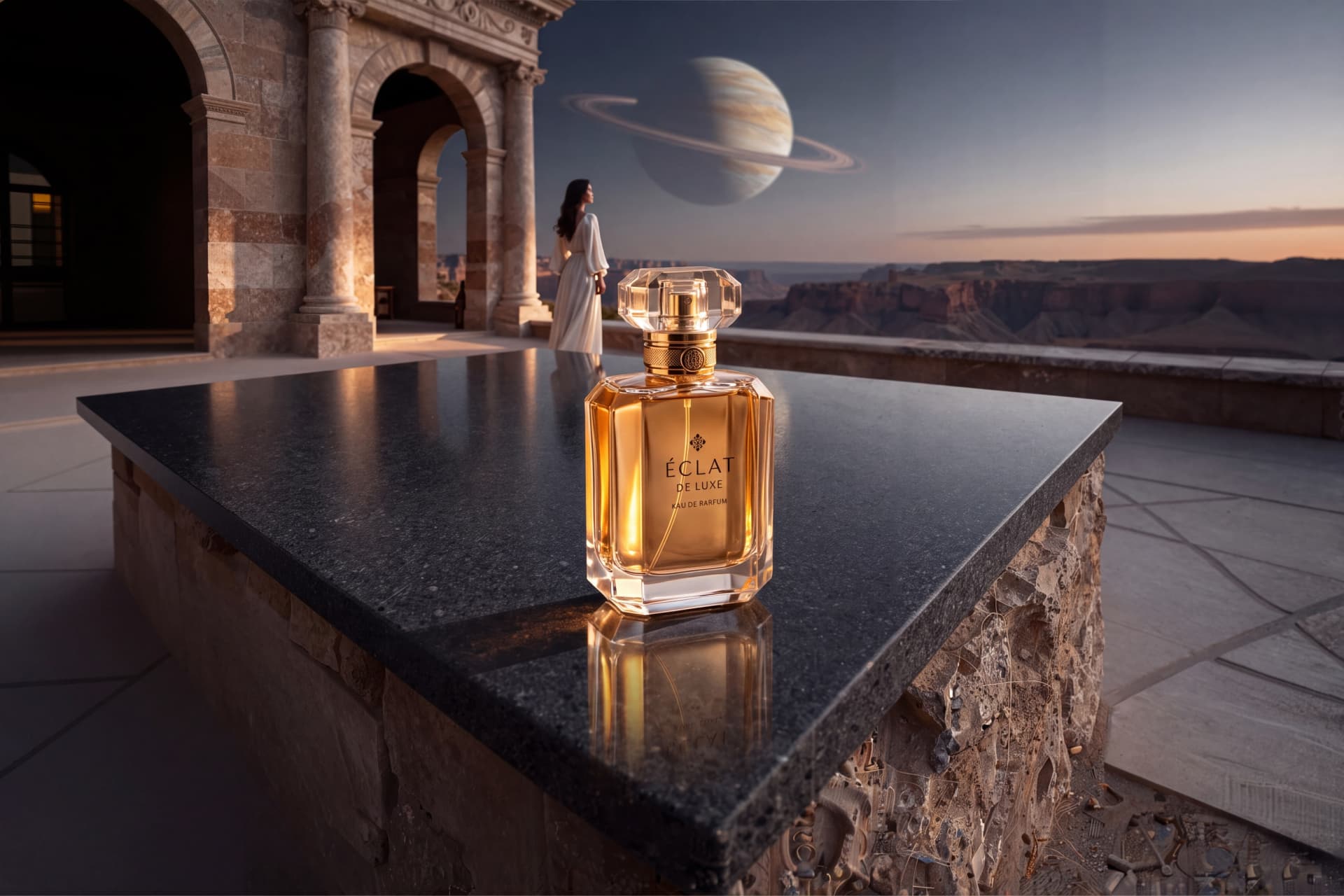
What does your product stand for — and what should it stand on?
A perfume bottle on a white table tells us what the object looks like. The same bottle beside an immense canyon, beneath the rings of an unfamiliar planet, invites us to imagine escape and discovery.
The surface beneath the product, the world behind it, and the light connecting them can suggest care, energy, curiosity, craftsmanship or escape. Here is how to turn that intention into a useful prompt.
Start with a feeling you can show
Before choosing scenery, finish this sentence:
When someone sees this product, I want them to feel ______ because ______.
Keep the answer specific. “Premium” leaves almost everything undecided. “The quiet confidence of having time to yourself” suggests a pace, a palette and a composition.
For our perfume concept, the creative direction is stillness and discovery. This is an imagined campaign direction, not a claim about the manufacturer. The perfume stays close and tangible; the world behind it feels vast. Stone architecture frames the canyon, a woman in an ivory dress adds a human presence, and a distant ringed planet gives the scene one memorable surprise.
You can use the same approach for very different products:
| Intended feeling | Make it visible through | Keep the product grounded on |
|---|---|---|
| Care and calm | Soft morning light, gentle colours, a quiet domestic setting | A broad ceramic or pale wood surface |
| Social energy | Warm evening light, activity in the middle distance, a lively colour accent | A café counter with a clear foreground |
| Craftsmanship | Directional light, fine material texture, a workshop with depth | A clean section of a substantial workbench |
| Discovery | A dramatic horizon, unexpected scale, a restrained cinematic palette | A level stone tabletop |
A background can express an association. It cannot prove that a product is sustainable, handmade or technically superior. Keep those claims tied to what is actually true.
Build a world around one strong idea
An impressive scene needs a focal point and a hierarchy. A planet, a waterfall, a crowd, fireworks and a racing car all fighting for attention will usually weaken the product story.
Choose one visual hook. Then give it three layers:
- Foreground: a surface that can physically support the product, with room for its base and contact shadow.
- Middle distance: the architectural opening, human activity or other detail that tells the story.
- Background: a horizon, landscape or atmosphere that gives the image depth.
For the perfume, that becomes a charcoal basalt tabletop, a stone observatory and a canyon beneath a ringed planet. The spectacle sits behind the product. The tabletop remains simple enough for a small, detailed object to read clearly.
Describe a broad, horizontal surface rather than just “a rock”. A narrow ridge or tilted slab may look dramatic but leave nowhere credible to place the product. A frontal camera at product height, a straight horizon and a visible portion of the tabletop help establish believable contact.
Give light a direction and a purpose
“Beautiful cinematic lighting” is a mood. “Warm amber light from the left, with cool blue light filling the canyon” is a decision the image can show.
Think about the product reference. A dark strap needs separation from a dark background. A pale label needs a backdrop that does not disappear into the same brightness. Glass and metal need readable edges without reflections hiding important details.
In this concept, warm light catches the glass bottle edges while the canyon stays cool. The materials support the contrast: dark stone beneath transparent glass and warm amber perfume. We reserve quieter space on the right for campaign copy to be added later.
Use two or three dominant colours as a starting point. More colour is not automatically more impact. Give each colour a job: atmosphere, separation or a small accent.
Use the prompt helper as a set of building blocks
Open Create scene. The Scene prompt area contains the editable Prompt preview and the category-based prompt builder. You do not need to fill every category.
Start with the three blocks that establish the scene:
- Product Surface: choose Material, Color and Finish. Use the nearest useful preset, then open Add custom details to describe what makes the surface specific. For this concept, the important details are a broad, level charcoal basalt tabletop and a fine satin texture.
- Location: select one location. Extend it with your own details, such as a stone observatory opening onto a desert canyon. Keep those details in one coherent setting.
- Lighting: choose a useful starting point, then describe direction, warmth and contrast. “Amber light from the left; cool blue atmospheric fill” is more actionable than a string of quality adjectives.
The other blocks — Character, Secondary Character, Animals, Foods and Objects — are optional storytelling tools. Add them when they contribute something meaningful. Leaving the character fields empty is a valid choice. Merely opening a category does not mean that you must include it.
Each category offers Combine presets and custom text. Leave it enabled when you want a preset and your own details together. Switch it off to use only the custom text for that category. Read the preview for accidental repetition: a preset and a custom phrase can describe the same thing twice.
Your selections update Prompt preview automatically. Build the categories first, then make your final prose edits there. Changing a building block afterwards can rebuild the preview and replace those edits, so keep a copy of any wording you want to preserve.
Use Reset on a category to remove an idea that no longer fits. Randomize can suggest an unexpected starting point, but it changes your configuration; use it when exploring. Save as Template and Load Template help you return to a useful setup. When loading, check whether you are combining it with the current setup or replacing it.
Brand Palette can add colour guidance. It is a creative direction, not a guarantee of exact colour reproduction. Studio guidance refines composition, lighting and detail; switch it off if you want to use your prompt directly. Review the finished image either way.
Turn the blocks into a complete background prompt
The builder gives you ingredients. Your final paragraph explains how they relate to one another. A useful order is setting → visual hook → surface → camera → light → clear placement area.
For an empty background in Create scene, the perfume concept becomes:
Empty product backplate inside a monumental circular stone observatory overlooking a vast desert canyon at blue hour. One enormous luminous ringed planet sits low in the distant sky, its rings sweeping across the upper right. A broad, level charcoal basalt tabletop spans the lower third, with fine satin texture and a completely clear centre-left placement area suitable for later compositing of a small product. The stone opening frames the canyon without crossing the placement area. A young adult woman in a flowing ivory dress stands on the terrace in the middle distance, looking towards the observatory, entirely behind the product plane. Camera frontal at product height, straight horizon, restrained perspective, enough of the tabletop visible to establish contact. Warm amber light grazes the surface from the left; cool blue atmospheric light creates layered depth in the canyon. Photographic materials and restrained reflections. Keep a quieter darker area on the right for later campaign copy. Foreground empty, no product, no packaging, no added text or logo.Notice what the prompt does not do: it does not ask Create scene to invent a perfume bottle. This route creates the environment first. You can then select it in Product Studio’s Use my own background mode, or finish your composite in Photoshop.
Take the concept into 6MP All-in-one
All-in-one starts with the product reference and creates the complete composition. Its scene description is a separate input from the Create scene builder. Copy and adapt your finished brief into All-in-one; do not assume the builder settings carry across automatically.
For this example:
- Choose the perfume bottle from the product library, or use a clear reference of your own product. Check that the whole bottle, cap, label and flat base are visible.
- Choose Something specific. This gives the scene a concrete direction instead of leaving the setting open.
- Paste the following brief into Describe your scene.
- Select Landscape — 3072 × 2048 · 6 MP. Think about the intended layout before choosing portrait or square instead.
- Review the current total beside Generate image. Output resolution and usage cost are different quantities: the 6MP landscape option displayed a 12 MP total during preparation of this guide.
Create a cinematic editorial campaign for the referenced perfume: a moment of stillness at the edge of an extraordinary world. A monumental circular stone observatory opens onto a vast desert canyon at blue hour, with one enormous luminous ringed planet low in the sky, its rings sweeping diagonally across the distant upper right. A broad, perfectly level charcoal basalt tabletop spans the lower third, fine satin texture and an uncluttered centre-left placement area. Place one referenced perfume bottle prominently on that surface, standing straight upright with its entire flat base resting firmly and visibly on the stone. Preserve its exact bottle shape, cap, label, glass, liquid colour and proportions. A young adult woman in an elegant flowing ivory dress stands in the middle distance on the terrace, looking towards the observatory, seen from behind in a gentle three-quarter view. Her feet rest naturally on the terrace; she is clearly behind the product plane and does not overlap the bottle. Camera at product height with a straight horizon and restrained perspective. A warm amber beam from the left grazes the stone and defines the perfume edges and dress; cool blue atmospheric light fills the canyon. Keep a quiet darker area on the right for later campaign copy. Photographic materials, deep layered space, realistic glass refraction and restrained reflections. Tight contact shadow directly beneath the entire bottle base, realistic directional cast shadow. No floating or leaning bottle, no watch, no extra perfume bottles, no added lettering.This version explicitly asks for the referenced product to be placed in the scene. Do not leave “no product” in an All-in-one brief copied from a backplate prompt.
The optional Preview scene action creates a paid written proposal, not an image preview. It can help you review the planned direction first. Check the current price and the proposal before proceeding; the All-in-one guide explains that workflow in more detail.
Judge the image at two distances
First, look at it small. Can you immediately find the product? Does the scene communicate the intended feeling? Does the big visual hook support the composition, or has it become the real subject?
Then inspect it close up beside the original reference. For perfume, compare the bottle silhouette, cap, label lettering, glass, liquid colour and proportions. Check contact with the surface and the direction of the shadow. A compelling scene still needs a product-fidelity review; asking the model to preserve details does not guarantee that it will.
The finished image above came from one successful All-in-one run: RunPod generated the background, then Gemini placed the perfume. The bottle has visible surface contact. The woman and dress are present, but she looks across the canyon rather than towards the observatory as requested. This is why the final image needs a visual review, even when every generation step succeeds.
If something is wrong, change the clause responsible for it:
| What you see | What to refine |
|---|---|
| The environment overwhelms the perfume | Ask for a more prominent product and lower contrast behind it |
| The product appears to float | Specify an upright bottle with its entire flat base resting on the surface and a tight contact shadow |
| Dark edges disappear | Request a restrained edge light or a slightly lighter area behind them |
| The scene feels busy | Remove a secondary motif and protect the product silhouette |
| There is no room for a headline | Reserve a specific quieter area; add typography in your layout tool |
Change one important variable at a time so you can learn what helped. Reusing a prompt is useful for comparison, but it does not promise identical output. More pixels can support a final layout; they do not repair an unclear idea or establish missing product details.
Before your next generation, ask the title question once more. If the product stands for quiet confidence, let the space, light and materials communicate that. The strongest background is one you remember — and one that helps you remember the product.